Kunbaa vs WhatsApp for Family Calls: Only Your Family Can Ring
Your mother stopped answering unknown numbers years ago. On Kunbaa, the only people who can ring her are her family. No phone number is handed out, one-to-one voice and video calls are free, and the call starts from the family tree, beside the photos you are talking about.
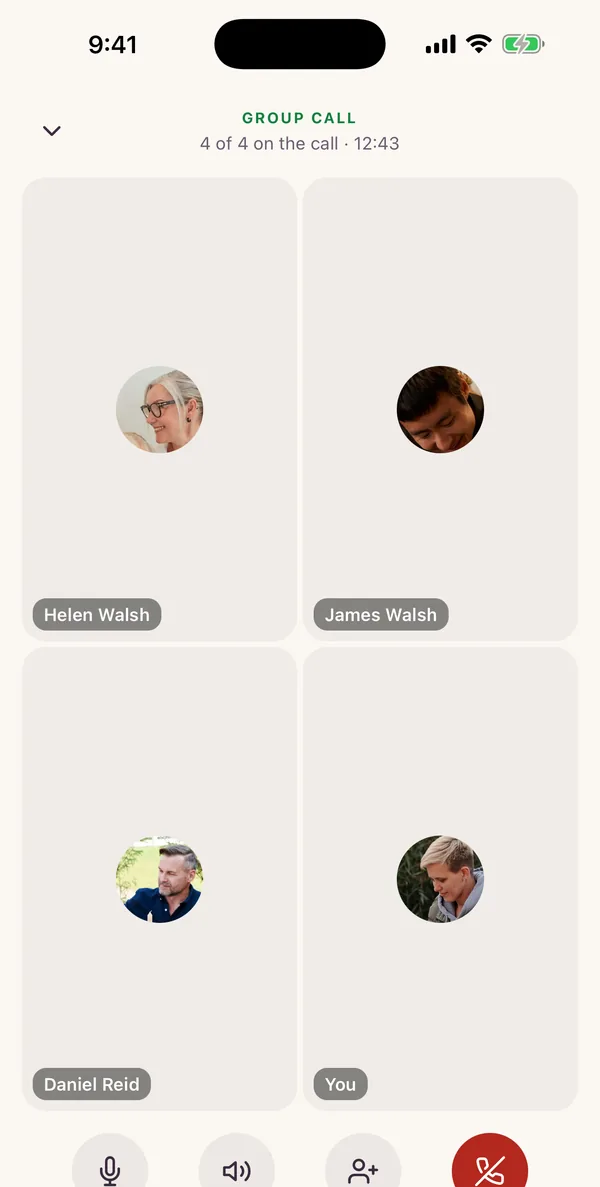
Calls are in the Kunbaa app for iPhone and Android.


On Kunbaa, only your family can ring you. Calls are voice or video, one to one, free and unmetered, and start from your direct line with a relative on the family tree. No phone number is handed out, and the photos you are talking about are one tap away. WhatsApp keeps two real advantages: its calls are end-to-end encrypted, and it carries group calls of up to 32 people, where a Kunbaa group call holds 6, started on Kunbaa Plus or Ultra. Kunbaa calls are in the app for iPhone and Android.
WhatsApp is still better at…
The day’s chatter, the forwards, and the relatives who will never install another app. Its calls are end-to-end encrypted, it carries calls with a whole room on them, and everybody already has it.
Call on Kunbaa for…
Every call to your parents, your grandmother or the cousin overseas. Voice or video, where only family can ring, nobody needs your number, and the photos and the tree you are talking about are one tap away.
What makes Kunbaa a private family calling app?
Only your family can ring you
Relatives join by invite link, not by phone number. No unknown numbers, no scam calls, no sales calls, and no group you were added to at 2am.
The call starts where the family lives
Open a relative's page on the tree, tap Message, and the call button sits at the top of your direct line, beside the wedding photo she is about to ask about.
Free and unmetered, for everyone
One-to-one voice and video calls are included for every family member with no minute count. Group calls of up to 6 come with Kunbaa Plus and Ultra, and anyone in the family can join one.
Nothing sold, no profiling
Kunbaa's revenue comes from its paid plans, and your call activity is never sold or used for advertising.
One app for the whole family
The tree, the family wall, chat, calls and events in one private space. The story your grandfather tells on the call can go straight onto the tree.
How do Kunbaa calls compare with WhatsApp calls?
Kunbaa calls are in the Kunbaa app for iPhone and Android.
Yes: YesPartly: Partly, or with a conditionNo: No
| Compared | Kunbaa | |
|---|---|---|
| Who can call you | Yes:Only the relatives in your invited family space. Nobody else can reach you through Kunbaa at all | Partly:Anyone on WhatsApp who has your number. You can silence unknown callers, block and report |
| Phone numbers | Yes:None handed out. Relatives join by invite link, and Kunbaa never places or receives calls on the phone network | No:You register with a phone number. Optional usernames, announced for later in 2026, keep it from new contacts |
| Being added to groups | Yes:There are no groups outside your family to be added to | No:Anyone with your number can add you to a group unless you limit it in privacy settings |
| Where the call starts | Your direct line with a relative on the family tree, beside the photos and stories you are talking about | Your chat list, alongside every other contact and group |
| One-to-one voice and video | Yes:Yes. Free and unmetered for every family member, on every plan | Yes:Yes. Free (data charges may apply) |
| Group calls | Partly:Yes, on Kunbaa Plus and Ultra: up to 6 people including you, voice or video, free to join for anyone in the family | Yes:Yes, up to 32 people, with unlimited duration |
| Encryption | No:Not end-to-end encrypted. Call audio is encrypted in transit (DTLS-SRTP, the WebRTC standard) | Yes:Personal calls are end-to-end encrypted |
| Ads | Yes:No ads on Plus and Ultra, and no personalised ads on Free. Who you call and how often is never used for advertising | Partly:Ads appear in Status and Channels on the Updates tab; personal calls are not used to choose them |
| Who already has it | No:Each relative joins by invite link and installs the Kunbaa app | Yes:Almost everyone in your family, already |
| Devices | Partly:The Kunbaa mobile app for iPhone and Android. Not the website | Yes:Phones, plus the Mac, Windows and iPad apps and the web |
| Around the call | The family tree, the family wall and memories, chat and events, in one app for the whole family | Your chats, groups, Status and Channels |
Who can call you
- Kunbaa
- Yes:Only the relatives in your invited family space. Nobody else can reach you through Kunbaa at all
- Partly:Anyone on WhatsApp who has your number. You can silence unknown callers, block and report
Phone numbers
- Kunbaa
- Yes:None handed out. Relatives join by invite link, and Kunbaa never places or receives calls on the phone network
- No:You register with a phone number. Optional usernames, announced for later in 2026, keep it from new contacts
Being added to groups
- Kunbaa
- Yes:There are no groups outside your family to be added to
- No:Anyone with your number can add you to a group unless you limit it in privacy settings
Where the call starts
- Kunbaa
- Your direct line with a relative on the family tree, beside the photos and stories you are talking about
- Your chat list, alongside every other contact and group
One-to-one voice and video
- Kunbaa
- Yes:Yes. Free and unmetered for every family member, on every plan
- Yes:Yes. Free (data charges may apply)
Group calls
- Kunbaa
- Partly:Yes, on Kunbaa Plus and Ultra: up to 6 people including you, voice or video, free to join for anyone in the family
- Yes:Yes, up to 32 people, with unlimited duration
Encryption
- Kunbaa
- No:Not end-to-end encrypted. Call audio is encrypted in transit (DTLS-SRTP, the WebRTC standard)
- Yes:Personal calls are end-to-end encrypted
Ads
- Kunbaa
- Yes:No ads on Plus and Ultra, and no personalised ads on Free. Who you call and how often is never used for advertising
- Partly:Ads appear in Status and Channels on the Updates tab; personal calls are not used to choose them
Who already has it
- Kunbaa
- No:Each relative joins by invite link and installs the Kunbaa app
- Yes:Almost everyone in your family, already
Devices
- Kunbaa
- Partly:The Kunbaa mobile app for iPhone and Android. Not the website
- Yes:Phones, plus the Mac, Windows and iPad apps and the web
Around the call
- Kunbaa
- The family tree, the family wall and memories, chat and events, in one app for the whole family
- Your chats, groups, Status and Channels
WhatsApp details from whatsapp.com and the WhatsApp Help Center, as of September 2026. They may change.
Who can call you on Kunbaa?
Only your family. Every relative joins your family space by an invite link you send, and a Kunbaa call can only happen between two people in that space. There is no phone number to find, no directory to search and no way for a stranger to ring. For a parent who has stopped answering unknown numbers because of the scam calls, that is the whole point: when Kunbaa rings, it is family.
Why start a call from the family tree?
Because that is where the reason for the call usually is. You find the photo of your grandmother at her own wedding, you open her daughter's page, tap Message, and ring your aunt from the same place. She asks who is standing on the left; the photo is right there. When the call ends, the name she remembered goes onto the tree while it is fresh.
Where is WhatsApp better for calls?
- Bigger group calls. Up to 32 people on one WhatsApp call. A Kunbaa group call holds 6, started on Kunbaa Plus or Ultra.
- End-to-end encryption. WhatsApp's personal calls are end-to-end encrypted. Kunbaa's are not.
- Everyone already has it. Nobody in your family needs an invite or a new app.
- More devices. WhatsApp calls work from its desktop and iPad apps and the web; Kunbaa calls are in the mobile app.
Can Kunbaa and WhatsApp work together?
Yes, and for most families that is the answer. The group chat stays where it is. That is where the day's chatter happens, and nobody is asking your uncle to stop forwarding things. The calls are what move: your dad on a Tuesday, the aunt who only picks up for family, the grandmother who stopped answering unknown numbers years ago. On Kunbaa those start from the tree, only her family can place them, and the photo she is about to ask about is already on the screen.
Related: for photos rather than calls, see Kunbaa vs WhatsApp for keeping family photos; read the longer guide to which app suits which call, how chat and calls work, and how private Kunbaa is; or start with the family tree and the private family app guide.
Frequently asked questions
Is Kunbaa a WhatsApp alternative for family calls?
For the call you actually make to family, yes. Voice or video, one to one, free and unmetered, or a group of up to 6 people including you on Kunbaa Plus and Ultra, which anyone in the family can join. Only the relatives you invited can ring you, and no phone number is handed out. WhatsApp is where the day's chatter happens and it is very good at that, and it still carries the whole-family call of 32. The Kunbaa call itself belongs where the family is: on your direct line with a relative on the tree, beside the photos you are about to ask about.
Can I call family without sharing my phone number?
Yes. Relatives join your family space by invite link, and calls happen inside the Kunbaa app between family members. You never hand out a phone number, and Kunbaa does not place or receive calls on the phone network, so a stranger or a sales call cannot reach you through it.
Does Kunbaa have video calls or group calls?
Both, yes, in the Kunbaa app for iPhone and Android (one-to-one calls are free). Video is one-to-one or in a group. A group call holds up to 6 people including you on Kunbaa Plus and Ultra, and anyone in the family can join one. For the whole family at once, WhatsApp carries 32.
Are Kunbaa calls end-to-end encrypted?
No. Kunbaa is not end-to-end encrypted, and we do not claim it is. Call audio is encrypted in transit with DTLS-SRTP, the WebRTC standard. Private in Kunbaa means invite-only and nobody's data sold. WhatsApp's personal calls are end-to-end encrypted. If that is what matters for a particular call, make it on WhatsApp.
Are Kunbaa calls free?
Yes. One-to-one voice and video calls are free and unmetered for every family member, on the free plan and on Kunbaa Plus. Calls use your internet connection, so your mobile carrier's data charges can apply, as they do for WhatsApp.
How do I start calling family on Kunbaa?
Install the Kunbaa app from the App Store or Google Play, start your family space and invite your relatives. Then open a relative's page on the tree, tap Message, and the call button is at the top of your direct line. Everyone you invite joins free.
Do we have to leave our family WhatsApp group?
No, and nothing here asks you to. The group is where the day's chatter happens. What moves is the call: on Kunbaa it starts from a relative's page on the family tree, only family can ring you, and the photos and stories you are talking about are already open beside it.
Call not connecting on a work or hotel network? See calls not connecting, or read the full FAQ.
A line only your family can ring.
Free one-to-one voice and video calls are in the Kunbaa app. Start your family space, invite the people you call most, and ring them from the tree.