Sunday lunch at Nani's, seen by everyone who couldn't be there
Your sister posts the photos, your uncle adds the video of the cake, and the family you invited sees them in order, and nobody else.
- Everyone in the family joins free
- Invite-only
- Nobody's data sold
- On Plus and Ultrawho sees each post
- Seen byon the posts you share
- Family onlyreactions and comments
- Freefor everyone in the family
The most family-focused app yet.
Kunbaa starts from the family: who is in it, who sees each post, and what the little ones watch.
- Kunbaa TVShort family stories to watch with the little ones, in the app.
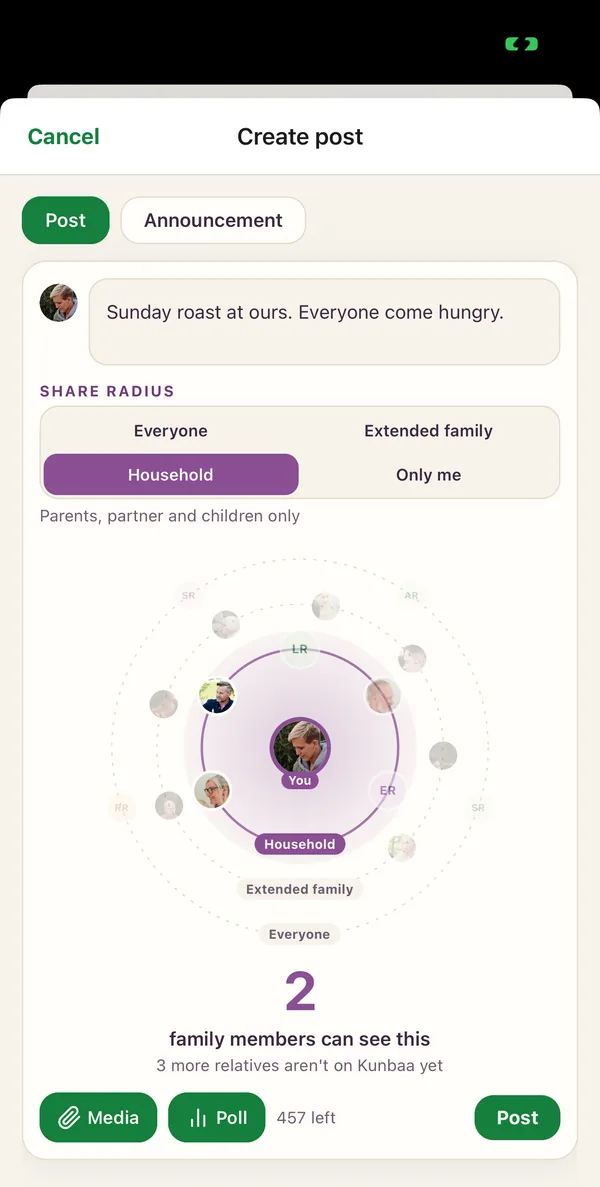
- Share radiusHousehold, extended family or the whole family, chosen on every post.
- Family treesBoth sides and every generation, on one private tree.
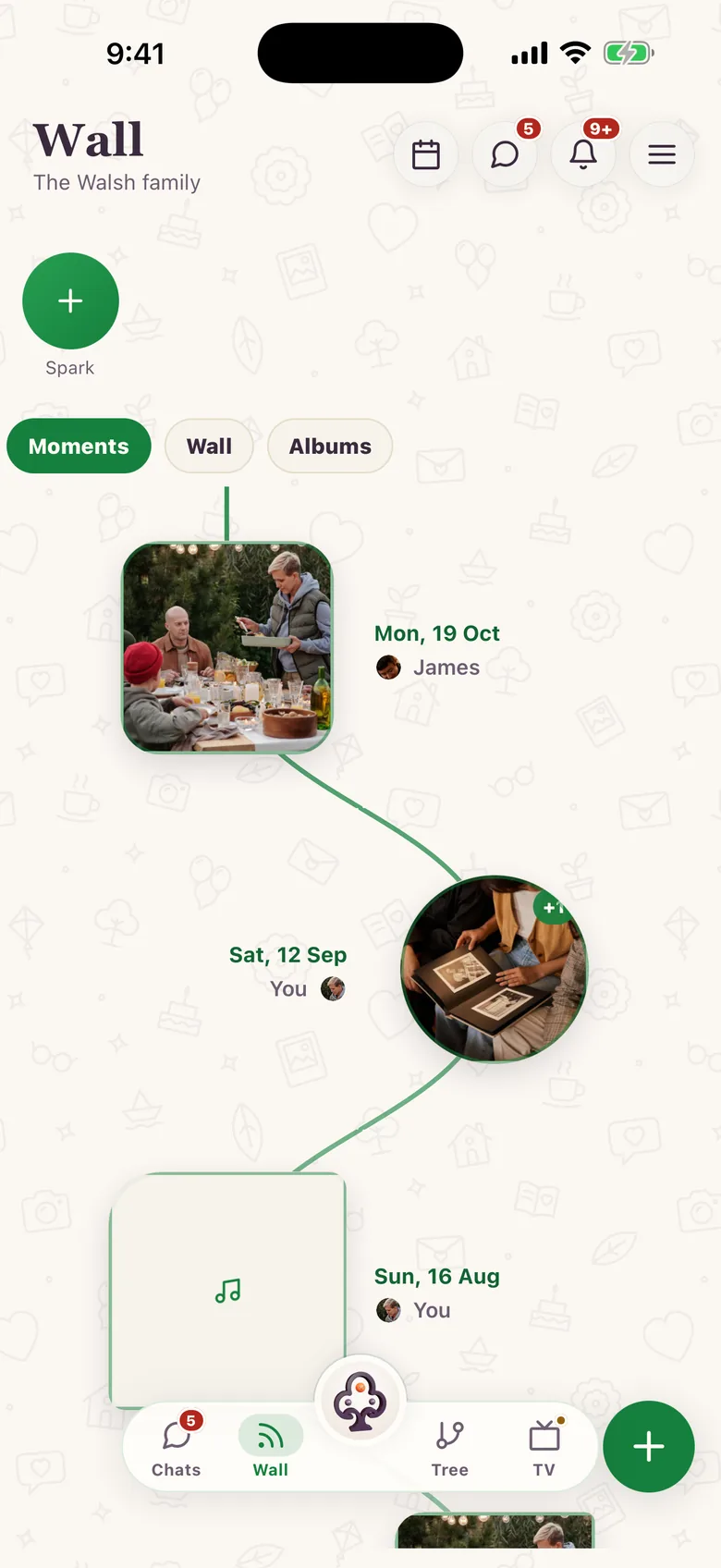
- MomentsThe family's photos, videos and voice notes, day by day.You are here
What is Kunbaa Moments?
Moments is where Kunbaa keeps your family's photos and videos: what your relatives post, newest first, seen only by the family you invite. No public followers, no algorithm, and never used to train AI. It replaces what Kunbaa used to call Memory Lane. The wall works on kunbaa.com today, with family albums and your family's year in review; the app's Moments board, which gathers them day by day and event by event, is in the Kunbaa mobile app.
How a family uses it
The family's photos, kept together.
This is the Kunbaa app itself, on test families. Keep scrolling to walk through it.
On the wall
The photos go to the family wall.
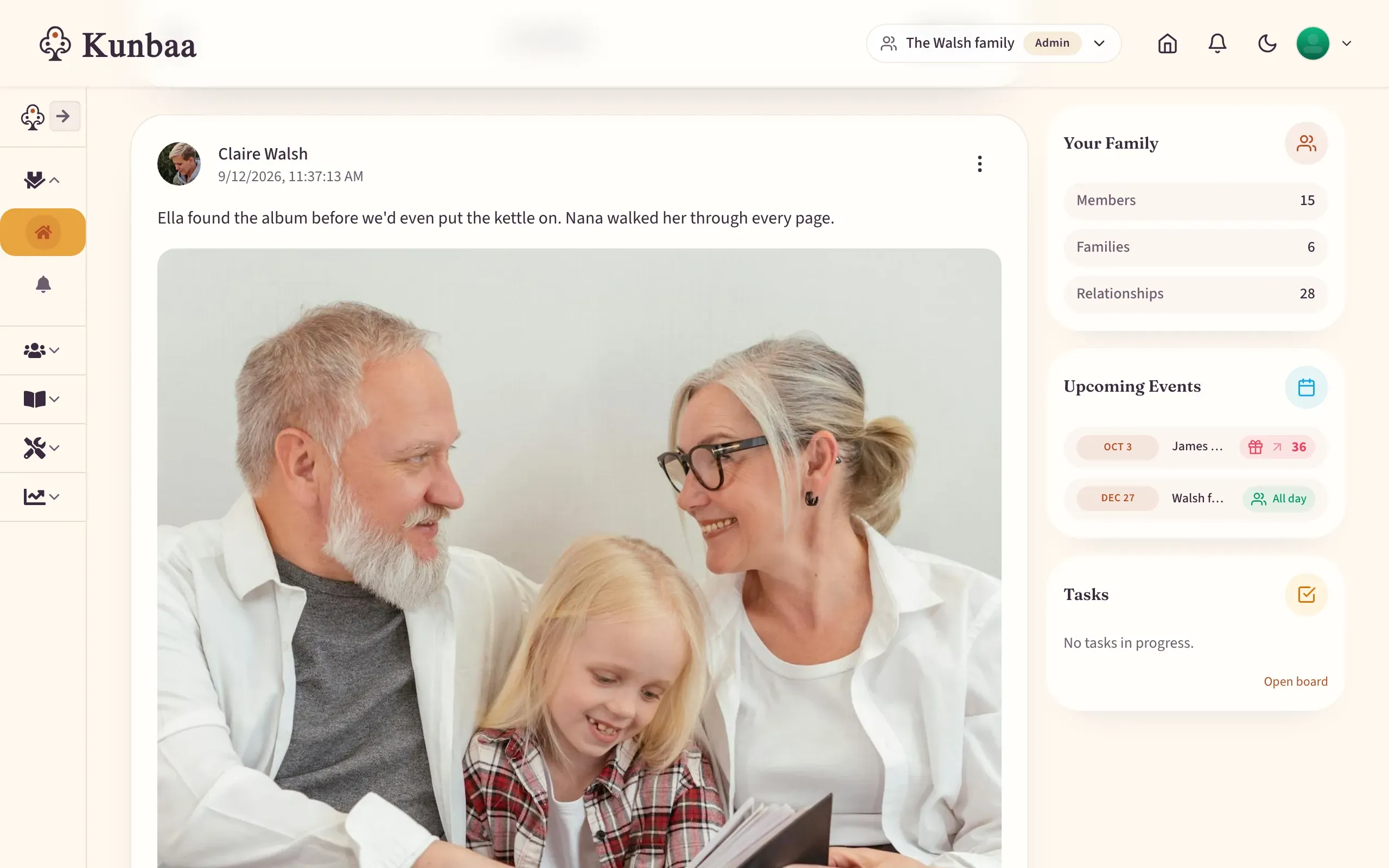
Photos, videos and updates in one post, newest first, with no ranking and no public feed. On Kunbaa Plus and Ultra you choose who sees each one: this one is for the Household. In the Kunbaa app, Moments gathers them by the day they were shared.
The old album
Write the story while someone remembers.
Post the photo from the shoebox with who, where and roughly when in the caption. Relatives add what they remember in the comments.
After the gathering
Turn the day into an album.
Pick the photos the family shared and give the album a name. With Kunbaa Plus, choose a style: this is Journal, a chapter for each day.
At the end of the year
Look back at your family's year.
The year in numbers, its busiest month, its biggest gathering and its first memory, counted only from what you can see.
Turn a weekend of photos into an album
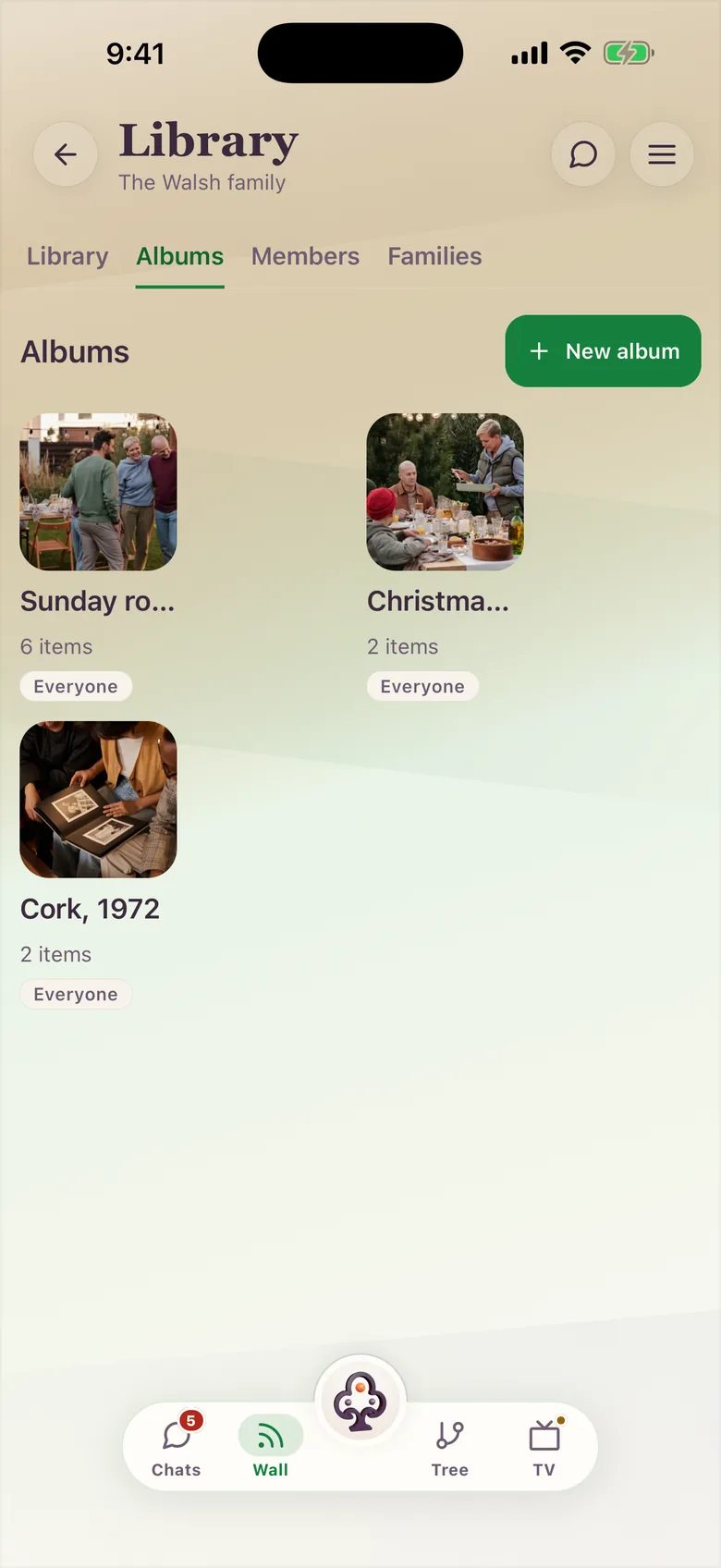
Pick what the family has already shared, give it a name, and the birthday, the trip or the year of the grandchildren stays together. An album never shows a photo to anyone who could not already see it.
- Albums on every plan. On kunbaa.com, and in the Kunbaa app from version 5.5.6.
- Six styles and frames with Kunbaa Plus. Journal, Seasons, Celebration and more; the owner chooses, and everyone sees the album that way.
- Your family’s year in review. The year in numbers, its first memory, its biggest gathering and its festivals, month by month, counted only from what you can see.
What can the family share on the wall today?
- Photos, videos and updates in a single post, on kunbaa.com.
- On Kunbaa Plus and Ultra, choose who sees it: everyone, your extended family, or your household.
- @mention a relative so they see it.
- Emoji reactions and comments, from family only.
- See which relatives have seen your own post (“Seen by”).
- Edit or delete what you posted.
- Photos from a gathering attached to the event afterwards.
- Albums from the photos the family has shared.
- Your family’s year in review.
- Announcements pinned above the wall.
What the Kunbaa app adds
- Moments, day by day. Wall photos and videos gathered by the day they were shared.
- Event albums. Each event’s photos as one moment, opening the event’s album.
- Sparks. Short family video clips as rings at the top of Moments; they last a day.
- Each relative’s moments. Together on their profile.
- Posts that show at once. Your post is on the wall the moment you share it, while the photos finish uploading.
Everything posted on the web appears in the app’s Moments view too.
Decided per post, by the person posting
On Kunbaa Plus and Ultra: everyone in the family, your extended family, or just your household. Pick the circle before you post. Everything is shared only with the family.
How is a private family wall different from a social feed?
| Compared | Kunbaa Moments | A public social feed |
|---|---|---|
| Who sees a post | Only the relatives you invited (or, on Kunbaa Plus and Ultra, per post, just your extended family or your household) | Followers, friends of friends or anyone, depending on settings |
| Order | Newest first, as the family shared it | Ranked by what keeps you scrolling |
| Reactions and comments | From family only: emoji reactions, comments and @mentions of relatives | From anyone who can see the post |
| Ads | No ads on Plus and Ultra, and no personalised ads on Free. Nobody's data is sold | Ads between your family's posts |
| What sits beside it | Your family tree, events and announcements | Everyone else you follow |
Who sees a post
- Kunbaa Moments
- Only the relatives you invited (or, on Kunbaa Plus and Ultra, per post, just your extended family or your household)
- A public social feed
- Followers, friends of friends or anyone, depending on settings
Order
- Kunbaa Moments
- Newest first, as the family shared it
- A public social feed
- Ranked by what keeps you scrolling
Reactions and comments
- Kunbaa Moments
- From family only: emoji reactions, comments and @mentions of relatives
- A public social feed
- From anyone who can see the post
Ads
- Kunbaa Moments
- No ads on Plus and Ultra, and no personalised ads on Free. Nobody's data is sold
- A public social feed
- Ads between your family's posts
What sits beside it
- Kunbaa Moments
- Your family tree, events and announcements
- A public social feed
- Everyone else you follow
Kunbaa details as of October 2026 and may change; the right-hand column describes public social feeds in general, not any one app.
Why does a family need its own wall?
The family photos are already somewhere. A group chat where last month is already out of reach, six camera rolls, a public feed. Moments gives them one place that belongs to the family, with the family tree beside it.
What makes it a modern wall
- Calm, not ranked. Newest first.
- Family-only reactions. Emoji reactions, comments and @mentions from relatives, not strangers counting likes.
- Events keep their photos. After a gathering, the photos attach to the event.
- The big news stays up. Engagements, arrivals and reunions go in Announcements, pinned above the wall.
How do you keep the story with the photo?
A photo outlives the people who remember it unless someone writes it down. Put the names, the place and roughly when into the caption while someone still knows, and let relatives add what they remember in the comments. A name, a year, the story behind it. It stays with the photo for the next generation.
A simple way to start
- Pick one gathering or one old album, not the whole camera roll.
- Post a handful of photos together; they lay out as one collage.
- Write who, where and roughly when in the caption. Approximate dates are fine.
- @mention the relative who knows the rest, and ask them to add it.
- Agree who scans which branch's albums, so the same shoebox is not scanned twice.
See capturing family moments for why the everyday ones are worth keeping, and the family wall page and help guide for how the wall works.
Related: the private family app, how private Kunbaa is, or Kunbaa vs FamilyAlbum. Choosing the best photo together? See family polls.
Frequently asked questions
More questions? Read the full FAQ or the help centre.
What are Kunbaa Moments?
Moments is where the family's photos and videos are kept: everything relatives post to the family wall, newest first, private to the family you invite. In the Kunbaa app the Moments board also gathers them by the day they were shared, with each event's photos as one album.
What happened to Memory Lane?
It became Moments. Everything that was in Memory Lane is in Moments, and the old Memory Lane page now points here.
Can we make family albums?
Yes. Pick photos and videos the family has already shared and put them in an album: a birthday, a trip, a year of the grandchildren. Albums are on every plan, and an album never shows a photo to anyone who could not already see it. With Kunbaa Plus the album's owner can also choose one of six styles and frames, and everyone who opens the album sees it that way. Albums are on kunbaa.com, and in the Kunbaa app from version 5.5.6.
What is the family year in review?
A look back at your family's year in Moments: the year in numbers, its first memory, its biggest gathering, its festivals and a month-by-month chart. It counts only what you can see, so it never reveals a post that was not shared with you.
Is Kunbaa a private Instagram for families?
Close, with the audience removed: a photo and video wall shared only with your invited family, no followers, no public profile, no feed ranking, beside your family tree, events and announcements, so the photos stay connected to the people in them.
Who can see what we post?
Only the relatives you invite. Nothing on the wall is public or indexed by search engines; a post goes to the whole family, or, on Kunbaa Plus and Ultra, if you choose, only your extended family or household, worked out from the tree and enforced on our servers.
Can I use Moments on the web?
Yes. On kunbaa.com today you post photos, videos and updates, mention relatives, react and comment, and attach photos to an event afterwards. The Kunbaa mobile app adds day-by-day Moments, Sparks and each relative's moments on their profile; anything posted on the web shows up there too.
Is there an algorithm or ads?
No algorithm: posts show newest first. Kunbaa Plus and Ultra have no ads. The free plan shows none today, and any ads on it would not be personalised. Nobody's data is sold, private family content is not used for third-party ad targeting, and revenue comes from the paid plans.
Are our family photos used to train AI?
No. Kunbaa never uses your family's photos, videos or stories to train AI models, and never uses them for advertising.
Why not just keep the photos in our WhatsApp group?
Keep the group for talking. WhatsApp compresses photos and videos, and media on its servers is kept only for a limited time, so an old photo can fail to re-download once the sender no longer has it. Moments keeps the family's copy in the family's own space, with the caption and the date it was shared, and the family's archive is never deleted.
Can our children post?
Kunbaa accounts are for adults, 18 and over. Children are in the family, on the tree and in the photos, and the adults keep the wall.
Is Moments end-to-end encrypted?
No, Kunbaa is not end-to-end encrypted. Private here means invite-only, no public feed, and nobody's data sold; the privacy help page explains exactly what that covers.
Is the family wall free?
Yes. Everyone posts, reacts and comments free. Kunbaa Plus at $9.99/mo or $99.99/yr on kunbaa.com or in the app keeps longer videos (free keeps short clips) and room for the whole family's archive; one person pays, everyone else joins free.